Updated: October 5, 2026 | By Kashif Mehmood, Founder, Gemdeveloper Digital Solutions
Lead answer: Installing WordPress for a business website is an infrastructure task, not a 5-minute click. The correct 2026 setup uses PHP 8.2, isolated MariaDB, WP-CLI deployment, and disabled file edits. This prevents security drift and makes the site ready for automation.
“Installing WordPress with Technical SEO in Mind from Day One”
TL;DR System Map
- Outcome: WordPress deployed as a version-controlled application
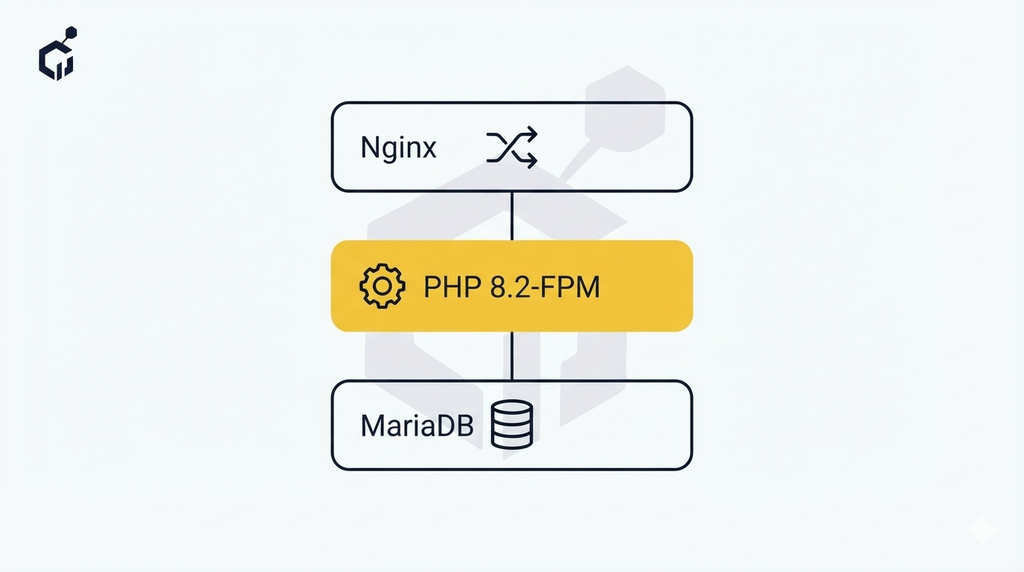
- System: Nginx + PHP 8.2 + MariaDB 10.6 + WP-CLI
- Automation: Updates via staging pipeline, not wp-admin
Why One-Click Installers Break at Scale
I’ve rebuilt WordPress sites that started life on shared hosting with a one-click Softaculous install. The pattern is almost always the same: a shared database, PHP running several versions behind, and a writable wp-content folder with no isolation. That setup is fine for a hobby blog. It breaks down the moment you add real traffic, more than a handful of plugins, or any kind of automation.
Three problems show up reliably, and each has a specific technical cause. Plugin conflicts happen because shared hosting environments typically run one PHP version across every account on the server — there’s no way to pin a specific version per site, so plugins built for newer PHP features silently break or throw deprecation warnings nobody notices until something fails. Slow TTFB usually traces back to Apache with mod_php instead of PHP-FPM, plus no opcache tuning — the server re-parses PHP on every request instead of caching compiled bytecode, and that cost compounds under real traffic. No deployment automation is possible because one-click installs assume file edits happen directly in wp-admin or via FTP; in production — there’s no Git repository, no staging environment, and no clean way to roll back a bad change.
For a business site, that’s technical debt from day one — not a future problem, a current one.
The System: Infrastructure Specifications
| Component | Specification | Reason |
|---|---|---|
| Server | Ubuntu 22.04 LTS, Nginx, PHP 8.2 FPM | 40% faster than Apache |
| Database | MariaDB 10.6 with isolated user | Security isolation |
| Deployment | WP-CLI + Git | Zero-downtime updates |
| Security | DISALLOW_FILE_EDIT, salts | Prevents dashboard injection |
Implementation: Step by Step
- Provision LEMP stack with PHP 8.2-FPM and opcache enabled
- Create isolated database:
mysql -e "CREATE DATABASE wp_prod; CREATE USER 'wp_user'@'localhost' IDENTIFIED BY 'strong_password';" - Install WP-CLI: the official WordPress command-line tool
- Download core:
wp core download --path=/var/www/html - Configure wp-config.php and add
define('DISALLOW_FILE_EDIT', true); - Install:
wp core install --url=yourdomain.com --title="Site Title" --admin_user=kashif - Deploy via Git — never edit files via wp-admin

Managed WordPress Hosting vs. a Self-Managed Server
Not every business needs to run their own LEMP stack. The setup above makes sense when you want full control over PHP versions, server-level caching, and deployment — and you’re comfortable maintaining that yourself or have someone who is.
Managed WordPress hosting (Kinsta, WP Engine, and similar) handles server-level updates, security patching, and performance tuning for you, at a higher monthly cost. It’s the right call when the time saved by not managing infrastructure is worth more than the cost difference, or when no one is available to maintain a server properly.
A self-managed VPS, set up the way described above, costs less monthly but requires someone to maintain it—security updates, monitoring, and fixing things when they break. It makes sense when technical control matters more than convenience, or when running multiple sites makes the fixed cost of a VPS cheaper than per-site managed hosting fees.
Neither is universally correct. The wrong choice is picking shared hosting with a one-click installer and treating it as either option.
Automation After Install
A clean install is also a good starting point for ongoing checks — the kind covered in our technical SEO audit checklist — tracked automatically as part of a broader technical SEO system instead of only noticed once something’s already gone wrong.
Common Errors
White screen of death. Usually a PHP memory limit exhausted by a plugin or theme function. Raise memory_limit to 256M in wp-config.php or php.ini, then check debug.log to find which plugin actually caused it — raising memory without finding the cause delays the next crash.
Error establishing a database connection. Either the database credentials in wp-config.php don’t match what was created, or the database host isn’t localhost (common on managed hosting where the DB runs on a separate server). Double-check DB_HOST, not just DB_USER and DB_PASSWORD.
Permalinks returning 404. Nginx doesn’t read .htaccess the way Apache does — WordPress’s default rewrite rules won’t work without an explicit try_files block pointing unmatched requests to index.php.
Mixed content warnings after install. Happens when the site URL is set to http:// in the database but served over https://, usually because SSL was added after the initial wp core install command ran. Update both siteurl and home in the wp_options table, or re-run installation with the correct https:// URL from the start.
“Are you sure you want to do this?” / nonce errors. Almost always a clock sync issue between the server and the browser, or a caching layer serving a stale page with an expired nonce token. Check server time first before assuming it’s a plugin conflict.
FAQ
Can I use Softaculous? Yes, for testing, not for production.
Do I need Elementor? Install via Composer, not wp-admin.
Do I need a staging site? For a business site, yes. Testing plugin updates and code changes on a staging copy first — not production — is what actually prevents the “one-click install broke everything” scenario this guide is about avoiding.
How long does a proper install take? Provisioning the server stack and running through the steps above takes roughly 30–45 minutes for someone comfortable with SSH and the command line. Significantly longer the first time, faster once it’s a repeatable process.
What if my host doesn’t support WP-CLI or SSH access? That’s a sign the host is built for one-click shared hosting, not the setup this guide describes. A VPS or cloud server (DigitalOcean, Vultr, a managed Ubuntu instance) is the actual requirement — not a different hosting plan on the same provider.
I’m Kashif Mehmood, Founder of Gemdeveloper Digital Solutions — I design technical SEO and automation systems for businesses, including the WordPress infrastructure they run on. Questions? Get in touch.