WooCommerce technical SEO is about controlling how products, categories, variations, filters, and other ecommerce URLs are crawled, indexed, and connected. As a store grows, technical problems can appear even when individual product pages are well optimized. The goal is not to get every WooCommerce URL indexed — it’s to make the right pages discoverable, technically accessible, internally connected, and worth indexing.
TL;DR — WooCommerce Technical SEO Checklist
| Area | What to Check | Priority |
|---|---|---|
| Product architecture | Important products are reachable through internal links | High |
| Categories | Logical and useful category structure | High |
| Indexing | Important products and categories are indexable | High |
| Variations | Duplicate or unnecessary variation URLs are controlled | High |
| Faceted navigation | Filter URLs have an intentional SEO strategy | High |
| Canonicals | Preferred URLs are consistent | High |
| Internal linking | Important pages are easy to discover | High |
| XML sitemap | Important URLs are included | Medium |
| Structured data | Product information matches the visible page | Medium |
| Performance | Product and category templates are tested | Medium |
| Out-of-stock products | Product lifecycle is handled deliberately | Medium |
Why generic ecommerce SEO advice breaks down at scale
- A normal business website may have a relatively small number of important URLs — a WooCommerce store can generate hundreds or thousands through products, categories, attributes, variations, filters, pagination, and internal search alone
- The challenge isn’t getting more pages indexed — it’s making sure search engines can distinguish genuinely important pages from URLs that provide little or no independent search value
- A store with 5,000 URLs does not necessarily have 5,000 SEO pages. The actual assets might be 20 important categories, 500 useful product pages, a handful of supporting editorial pages, and a limited set of deliberate landing pages
- Everything else needs to be evaluated on its own purpose — not indexed by default just because WooCommerce generated a URL for it
1. Start With WooCommerce Site Architecture
Before changing product titles, meta descriptions, or structured data, look at the architecture.
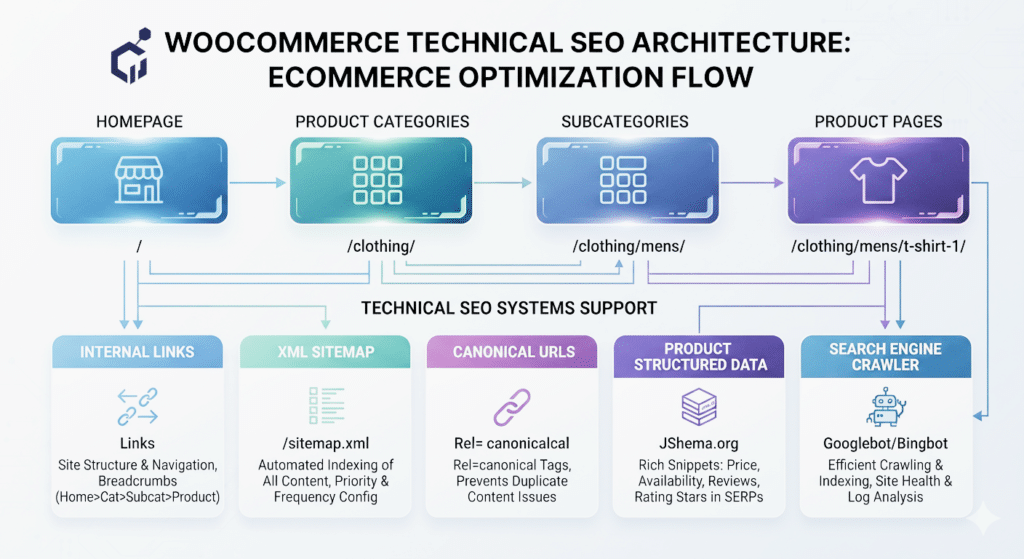
A straightforward ecommerce website structure might look like:
Homepage → Category → Subcategory → Product
For example: Home → Running Shoes → Trail Running Shoes → Product
This creates a logical relationship between the pages. Google recommends making important ecommerce pages discoverable through crawlable links and using category and navigation structures to help search engines understand how pages relate to one another.
Ask these questions during an audit:
- Can important products be reached from category pages?
- Are important categories linked from the main navigation?
- Are products buried unnecessarily deep?
- Are there orphaned products?
- Are important pages accessible only through internal search?
- Does the category hierarchy reflect how users actually shop?
An XML sitemap can help with discovery, but it should not be used to compensate for a broken internal linking structure. This is the same architectural thinking behind our approach to technical SEO systems generally — structure decisions made once, upfront, prevent most of the cleanup work later.
2. Product Pages and Category Pages Have Different SEO Purposes
One common ecommerce SEO mistake is treating every page as though it has the same search intent. It doesn’t.
Product pages normally target a specific product or highly specific commercial search. Depending on the store, they may need: product name, useful description, images, price, availability, specifications, brand, SKU, reviews where applicable, and appropriate structured data.
Category pages serve a broader commercial intent. For example, “Men’s Running Shoes” is different from “Nike Air Zoom Pegasus.” The category page can target the broader product group while the product page targets the individual product.
This is why a strong WooCommerce website needs both product-level optimization and category-level architecture.
3. Don’t Create Thin Categories Just for SEO
More categories do not automatically create more SEO opportunities. A category containing only a few products, little useful information, and no meaningful differentiation from other categories may result in another weak URL rather than a useful landing page.
Before creating or keeping a category, consider:
- Does it represent a genuine product group?
- Does it contain enough useful products?
- Is it meaningfully different from its parent and sibling categories?
- Would customers actually use it?
- Does it deserve organic search visibility?
- Does it have a clear place in the site’s navigation?
The SEO decision should follow the site’s architecture and user needs — not the other way around. Don’t create a category simply because you found another keyword.
4. Control Product Variations Carefully
WooCommerce variable products can contain different sizes, colors, materials, models, capacities, or configurations. This is useful for customers, but it can create technical SEO complications when variations begin generating separate URLs or substantially duplicated content.
The important question is: does this variation represent a genuinely useful search destination, or is it simply an option belonging to the main product?
For example, a shirt available in five colors does not automatically require five competing product pages. If variants genuinely need to exist as separate search destinations, their relationship with the parent product should be deliberately structured. If they’re simply options of one product, creating separate indexable URLs for every variation adds unnecessary complexity.
Technical possibility does not automatically equal SEO value.
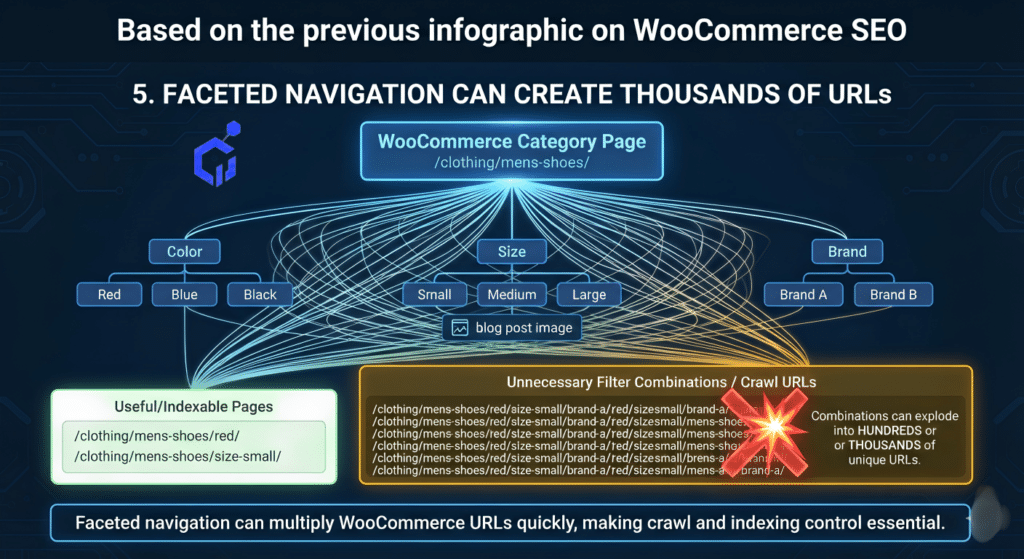
5. Faceted Navigation Can Create Thousands of URLs
Filters are extremely useful for shoppers. A customer might want: black shoes, size 10, Nike, waterproof, under $150.
But combining those filters can generate many URL combinations. For example, /shoes/?color=black could become /shoes/?color=black&size=10&brand=nike&waterproof=yes. Add more attributes and the number of possible combinations can grow very quickly.
[IMAGE 2 HERE — alt: “WooCommerce faceted navigation creating multiple filter URLs and potential crawl complexity”]
This is one of the most important technical SEO issues to investigate on larger ecommerce websites.
The key distinction: a useful shopping filter is not automatically a useful SEO landing page. Some filtered combinations may have genuine search value; others provide little independent value and just create additional URLs for crawlers to process.
During an audit, identify: filter parameters, attribute combinations, sorting URLs, search URLs, duplicate combinations, and URLs that generate little or no unique value. Then decide which combinations actually deserve an SEO strategy.
6. Canonical Tags Are Not a Magic Fix
Canonicalization is important for ecommerce websites, particularly when multiple URLs represent similar or duplicate content. But adding a canonical tag does not automatically solve every duplication problem.
The preferred URL should also be supported by internal links, an XML sitemap, URL structure, redirects where appropriate, page content, and overall site architecture.
Instead of asking “Can we add a canonical tag?” ask “Which URL should actually represent this content, and do our other technical signals support that decision?” That’s the more useful technical SEO question.
7. Make Important Products Easy to Discover
A product can be published and technically accessible while still having a weak discovery path. Homepage → Category → Product provides a clear path — but if a product is only accessible through internal search or a complicated combination of filters, its discovery becomes more dependent on additional mechanisms.
During an audit, look for: orphaned products, weakly linked products, important categories with poor internal linking, products buried unnecessarily deep, and important commercial pages receiving little contextual linking.
Don’t only count how many URLs exist. Map how those URLs are connected.
8. Keep the XML Sitemap Clean
An ecommerce sitemap should help search engines discover the URLs that matter — it should not become a dumping ground for every URL the platform can generate.
Review whether the sitemap contains important product pages, important category pages, preferred URLs, current URLs, and indexable pages. Also investigate whether it contains URLs that are redirected, canonicalized elsewhere, noindexed, permanently removed, or unwanted filter combinations.
A sitemap cannot repair poor architecture, but it can provide another useful discovery signal for important pages.
9. Use Product Structured Data Correctly
Product structured data helps search engines understand information about products and can make eligible pages available for enhanced search experiences.
Depending on the product and implementation, structured data can represent information such as:
- product name
- Image Brand
- SKU
- Price Availability
- Reviews
- Shipping information
- Return information
For product variations, structured data can also describe relationships between variants and their parent product.
The important rule is simple:
Structured data should describe the actual product page.
Do not use structured data to add information that users cannot find on the page. If the visible page says one thing and the structured data says another, the markup is not fixing the underlying problem.
10. Handle Out-of-Stock and Discontinued Products Carefully
Out-of-stock does not automatically mean a product URL should be deleted. A product may be temporarily unavailable while still having organic traffic, backlinks, rankings, returning visitors, and historical SEO value. A permanently discontinued product is a different situation.
Before removing a product URL, check:
- Is the product coming back?
- Is there a direct replacement?
- Is there another product satisfying the same intent?
- Does the URL have backlinks?
- Does it receive organic traffic?
- Does it have ranking history?
- Can the page continue helping users?
Avoid blanket rules such as “out of stock = delete.”
The correct technical decision depends on the product’s lifecycle and URL value.
11. Don’t Optimize Only the Homepage for Performance
WooCommerce performance should be evaluated across the templates that actually matter
- homepage
- category page
- subcategory page
- product page
- filtered category
- search page
- cart
- and checkout where relevant
A store can have a fast homepage while product pages remain heavy because of large images, variation data, reviews, third-party scripts, tracking systems, marketing plugins, payment integrations, or poorly optimized extensions.
The objective isn’t a good performance score on one URL; it’s to understand the performance behavior of the ecommerce system.
12. Audit Internal Linking Like an Ecommerce System
A healthy WooCommerce structure might connect Homepage → Category → Subcategory → Product. But contextual links can also connect Blog Article → Category, and Buying Guide → Relevant Product — creating additional useful paths through the website.
Don’t force exact-match anchor text everywhere. A link should make sense in context. An article explaining how to choose trail running shoes can naturally link to a relevant trail-running category — that helps the user while also strengthening the site’s internal architecture.
13. A Practical WooCommerce Technical SEO Audit
When auditing a WooCommerce website, work through the following sequence.
Step 1 — Crawl the website. Identify products, categories, tags, attributes, filters, pagination, search URLs, redirects, errors, and canonicals.
Step 2 — Separate useful URLs from generated URLs. Create groups such as “Important SEO pages” and “Technical/generated URLs” — this makes the crawl much easier to understand.
Step 3 — Check indexability. Review indexable products, indexable categories, noindex pages, canonical targets, redirects, and duplicate URLs.
Step 4 — Check discovery. Can important products be reached through crawlable links? Are important categories linked? Are there orphan pages? Are important pages unnecessarily deep?
Step 5 — Check faceted navigation. Identify filter parameters, attribute combinations, sorting URLs, search URLs, and duplicate combinations. Then determine which combinations genuinely deserve SEO treatment.
Step 6 — Check structured data. Make sure product information in structured data matches the actual visible page.
Step 7 — Check performance. Test representative ecommerce templates rather than only the homepage.
Step 8 — Compare the findings with Search Console. This is where technical SEO becomes much more useful. Look for pages receiving impressions, unexpected ranking URLs, indexed URLs you didn’t intend to index, important pages with weak visibility, queries landing on the wrong page, and products or categories with visibility but poor rankings. Don’t assume a theoretical technical issue is hurting a site until the available evidence supports the conclusion. See our Website optimization practical workbook for the equivalent process on non-ecommerce sites.
WooCommerce Technical SEO Quick Checklist
Architecture: Logical product/category hierarchy · Important products reachable through crawlable links · No important orphan products · Important categories linked internally
Indexing: Important products indexable · Important categories indexable · Search-result URLs controlled · Filter URLs have an intentional strategy · Empty/low-value pages handled appropriately
Canonicals: Preferred product URL identified · Canonical tags consistent · Internal links use preferred URLs · Sitemap supports preferred URLs
Variations: Variation architecture understood · Duplicate URLs controlled · Product/variant relationships clear · Structured data reflects actual variants
Faceted Navigation: Filter parameters identified · Unnecessary combinations controlled · Valuable filter pages deliberately optimized · Crawl waste monitored
Products: Useful product content · Accurate price and availability · Proper images · Product structured data · Clear product lifecycle strategy
Performance: Product template tested · Category template tested · Images optimized · Third-party scripts reviewed · Heavy plugins/extensions investigated
Final Thoughts
WooCommerce technical SEO is not about making every product, variation, filter, and category indexable. It’s about making the right pages discoverable, understandable, and valuable.
A technically strong store gives search engines a clear path through its architecture — Homepage → Categories → Products — while controlling the URLs generated by variations, filters, searches, and other ecommerce functionality.
The larger the store becomes, the more important this distinction becomes. You don’t want thousands of URLs simply because WooCommerce can generate thousands of URLs. You want an ecommerce architecture where search engines can understand which pages matter, how they’re related, which URLs represent the same content, and which pages deserve organic visibility. That’s the foundation of WooCommerce technical SEO.
FAQ
Is WooCommerce good for SEO? Yes. WooCommerce can support a technically strong ecommerce website, but the final SEO quality depends heavily on the website’s architecture, theme, plugins, URL handling, internal linking, indexing controls, and implementation.
Should every WooCommerce product be indexed? No. Important and useful product pages generally should be accessible and indexable, but automatically indexing every generated URL, filter combination, or duplicate version is not a good strategy.
Should WooCommerce product variations be indexed separately? Not automatically. The correct approach depends on whether variations represent meaningful independent search destinations or simply options that belong to a parent product.
Are WooCommerce filter URLs bad for SEO? Not inherently. Filters are useful for users. The problem occurs when large number of low-value filter combinations become crawlable and create unnecessary URL complexity.
Do canonical tags fix WooCommerce duplicate content? Canonical tags are an important signal, but they should work together with consistent internal links, sitemaps, redirects, and site architecture.
What is the most important WooCommerce technical SEO issue? There is no universal single issue. For larger stores, architecture, crawlability, indexability, and URL management should generally be investigated before spending time on minor on-page optimizations.