
Technical SEO automation doesn’t mean letting a workflow make SEO decisions on its own. The useful version of it automates the repetitive data work — collecting URLs, checking status codes, pulling metadata, gathering indexing signals, mapping internal links, building reports — while a person still makes the actual calls: what to prioritize, what to merge, what to leave alone.
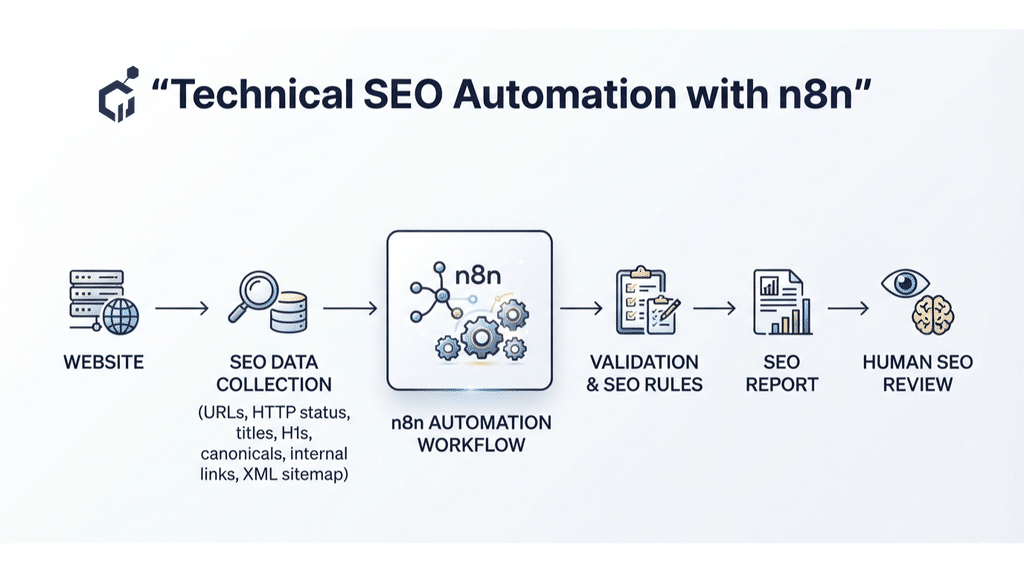
That distinction matters more than it sounds. Much automation content treats a tool as the strategy. It isn’t. The tool does the counting and checking faster than a person can, so the person can spend their time on the judgment calls that actually need judgment.
TL;DR
| Task | Manual process | Automated approach |
|---|---|---|
| URL collection | Export manually | API/crawl source |
| Status checks | Spreadsheet review | HTTP checks |
| Metadata | Manual inspection | Extract automatically |
| Indexing signals | Repeated checks | Collect into dataset |
| Internal links | Crawl/export | Process automatically |
| Reporting | Build manually | Generate structured report |
| Issue detection | Review rows | Rules/conditions |
| Final decisions | Human | Human |
What Is Technical SEO Automation?
Technical SEO automation is the use of scripts, workflows, or tools to handle the repeatable, data-heavy parts of an SEO audit — the parts that involve checking hundreds or thousands of URLs the same way, over and over, rather than thinking about any single one of them individually.
It’s not a separate discipline from technical SEO. It’s the same work, just with the repetitive collection and checking handled by a workflow instead of a person clicking through pages one at a time. The strategy — what the findings mean and what to do about them — still comes from a person.
What Should You Automate in a Technical SEO Audit?
The tasks that genuinely benefit from automation are the ones that are repetitive, rule-based, and don’t require interpretation to execute — just to review afterward:
- URL discovery
- Status codes
- Redirects
- Canonical URLs
- Title tags
- Meta descriptions
- H1s
- Indexability
- Sitemap URLs
- Internal links
- Orphan-page detection
- Broken links
- Page templates
Each of these has a clear, checkable answer — a page either returns a 200 or it doesn’t, a meta description either exists or it’s missing. That’s exactly the kind of task a workflow can handle reliably, at scale, without needing to understand the site’s strategy first. Google’s own guidance on crawling and indexing covers the technical baseline most of these checks are built around.
This applies across site types, too — a WooCommerce store has more of these URLs to check, and a few extra ones (variations, filtered category combinations) worth understanding before automating anything against them; see our WooCommerce technical SEO guide for that side of it specifically.
What Should You NOT Automate Completely?
This is the part that gets skipped in most automation content, and it’s the part that actually matters.
Some decisions look automatable because they involve data — but they’re not, because the right answer depends on context a workflow doesn’t have:
- Search intent
- Keyword targeting
- Cannibalization decisions
- Whether content should be merged
- Whether a page should be deleted
- Commercial prioritization
- Strategic redirects
A workflow can tell you that two pages target overlapping keywords. It can’t tell you which one should win, whether merging them would lose meaningful traffic from the one that gets folded in, or whether a competitor just published something that changes the calculus. Those are judgment calls that depend on business context — not something a rule can decide safely.
This is also why a preserve-first approach to SEO — never deleting or merging content automatically, never letting a tool decide a URL isn’t worth keeping — holds up even as more of the surrounding process gets automated. It’s the same principle behind how we think about technical SEO systems generally: automation should surface the decision. It shouldn’t make it.
How n8n Fits Into a Technical SEO Workflow
n8n is one way to build the automated part of this pipeline — not the strategy itself, just the plumbing that moves data from one step to the next. It’s a fairly common choice for this kind of SEO automation system, since it connects APIs, spreadsheets, and scheduled triggers without needing custom infrastructure for each piece:
Data Sources → n8n → Processing → Rules → Google Sheets/Database → Human Review
Data comes in from wherever it lives (a site’s REST API, a crawler, an SEO tool’s API). n8n moves it through processing and rule-checking steps. The output lands somewhere reviewable — a spreadsheet or database — and a person looks at it before anything changes on the actual site.
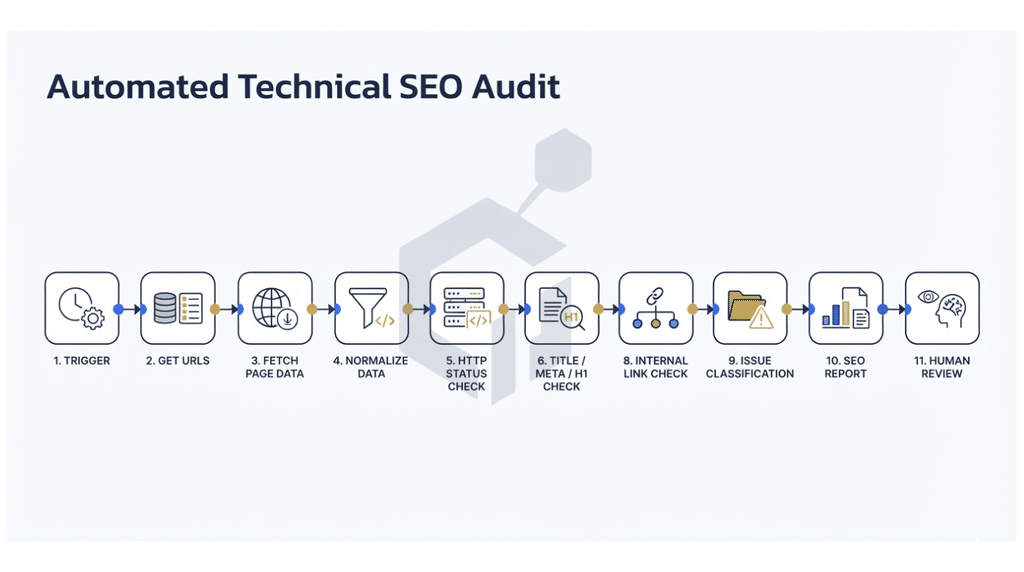
The human review step at the end isn’t optional or a formality. It’s the point where the automation’s output gets filtered through actual judgment before it turns into a decision.
Example Technical SEO Automation Workflow
A practical version of this kind of workflow generally follows this shape:
Trigger
  ↓
Collect URLs
  ↓
Fetch page data
  ↓
Normalize data
  ↓
Run technical checks
  ↓
Classify issues
  ↓
Prioritize
  ↓
Write report
  ↓
Human review
Each step does one job. The trigger starts the run (on a schedule, or manually). URL collection gathers what needs checking. Fetching pulls the actual page data. Normalizing puts it into a consistent format regardless of source. Technical checks run the rule-based tests. Classification sorts issues by type. Prioritization ranks them by likely impact. The report step turns all of that into something readable. And then a person reviews it — which is where the automation’s job ends and the actual SEO work begins.
Automating WordPress SEO Data With the REST API
This is where the idea becomes concrete rather than theoretical.
WordPress exposes posts, categories, pages, and other site content through its built-in WordPress REST API, that makes it possible to pull structured content data programmatically instead of exporting it by hand. The posts endpoint specifically returns fields like title, content, link, modified date, and category assignments — that is enough to build an automated content inventory without touching the WordPress admin screen for each post individually.
This is a genuinely practical starting point for a lot of the automation described above: instead of manually exporting a list of URLs to check, a workflow can pull that list directly from the site itself, already structured, already current. It pairs naturally with a WordPress technical SEO audit — the audit defines what to look for, and the API is one way to pull the data needed to check it at scale.
Automating Internal-Link Analysis
Automation can help identify patterns that would take a long time to find manually:
- Pages with few contextual links pointing to them
- Heavily linked pages (which may be worth reinforcing further, or may indicate over-concentration)
- Article-to-service page relationships
- Potential orphan pages
- Topical clusters that have formed naturally, or gaps where one hasn’t
What it shouldn’t do is act on any of that automatically. Automation can flag “this page has almost no internal links pointing to it” — it shouldn’t then go insert links into other pages to fix that on its own. The recommendation is useful. The insertion still needs a person deciding whether that link actually makes sense in context.
Sitemaps specifically are worth checking on their own — Google’s documentation on sitemaps is a useful reference for what a sitemap should and shouldn’t contain, which is a reasonable baseline to automate a check against (are noindexed or redirected URLs still showing up in the sitemap, for example).
Automating Technical SEO Reporting
Once data is collected and checked, the useful output is a structured report a person can act on quickly.
Illustrative example: The rows below demonstrate how an automated SEO report can be structured. They are not findings from a specific website audit.
| URL | Issue | Severity | Evidence | Recommended action |
|---|---|---|---|---|
| /example-page/ | Missing meta description | Medium | No meta description detected | Review and add a relevant description |
| /example-product/ | 3xx redirect | Low | HTTP response returned a redirect | Check whether the redirect is intentional |
| /example-category/ | Few internal links | Medium | Limited crawlable links detected | Review contextual linking opportunities |
A report shaped like this does the sorting and flagging work automatically, but every “recommended action” is a suggestion for a person to evaluate — not an instruction the system carries out by itself.
Common Mistakes in SEO Automation
A few patterns show up repeatedly when automation gets built without the human-review boundary in mind:
- Automating bad SEO rules — the automation only enforces what it’s told; if the underlying rule is wrong, it just makes the mistake faster and at scale
- Treating every 404 as an emergency — not every broken link is worth fixing immediately, and blanket urgency wastes review time
- Automatically changing canonicals — this affects which URL Google actually indexes; it shouldn’t happen without review
- Automatically rewriting titles — titles affect click-through and messaging, not just technical compliance
- Creating duplicate pages — an automation that generates pages to “fill gaps” can create more duplication problems than it solves
- Relying on one crawler or data source — different tools surface different issues; one source alone can miss things
- Ignoring search intent — a technically clean page that doesn’t match what searchers actually want still won’t perform
- Confusing data collection with SEO strategy — gathering the data is the easy part; deciding what it means is the actual work
A Practical Technical SEO Automation Checklist
- Crawl data
- HTTP status
- Indexability
- Titles
- H1
- Canonical
- Sitemap
- Internal links
- Redirects
- Content classification
- Reporting
- Human review
FAQ
What is technical SEO automation?
The use of workflows or tools to handle the repetitive, data-heavy parts of a technical SEO audit — collecting URLs, checking status codes, pulling metadata — while strategic decisions stay with a person.
Can n8n automate an SEO audit?
It can automate the data collection, checking, and reporting steps of an audit. It doesn’t replace the analysis and decision-making that follows.
What SEO tasks can be automated?
Rule-based, repeatable checks — status codes, redirects, canonical URLs, metadata presence, sitemap validation, internal-link mapping. Anything with a clear right-or-wrong answer that doesn’t require interpreting context.
Is n8n useful for SEO agencies?
Yes, for handling repetitive technical checks and reporting across multiple sites or clients at scale — freeing up time that would otherwise turn into manual data collection.
Can SEO automation replace an SEO specialist?
No. It replaces the manual labor of data collection and checking. It doesn’t replace the judgment needed to interpret findings, prioritize work, or make strategic decisions about content and structure.
Where This Fits Into a Broader SEO Process
None of this works as a standalone project — it’s most useful as part of an ongoing process, where the same checks run consistently over time instead of once during a single audit. That’s the same approach behind our technical SEO and auto
mation services: automate the repetitive data work, keep the strategic decisions with the people who understand the site.
